Article
How Capture One's Cull Feature Cut My Photo Selection Time by 10x
Oveth Martinez
8.21.25
If you've worked with me on a shoot, you already know I'm a little obsessed with turning things around fast. But there's a part of my workflow that used to be my biggest bottleneck, and it wasn't the shooting, and it wasn't even the editing. It was making selects.
For years, especially on multi-day campaign shoots, picking the final images out of thousands of frames was the slowest, most draining part of my job. I'd sit there scrolling through folder after folder, flagging, un-flagging, second-guessing myself, and by the time I was actually ready to start editing, days had already gone by. Clients were waiting. I was burnt out before I'd even opened a single retouch tool.
That's completely changed since I moved my workflow over to Capture One, and specifically since I started using their Cull feature the right way.
What Cull Actually Does
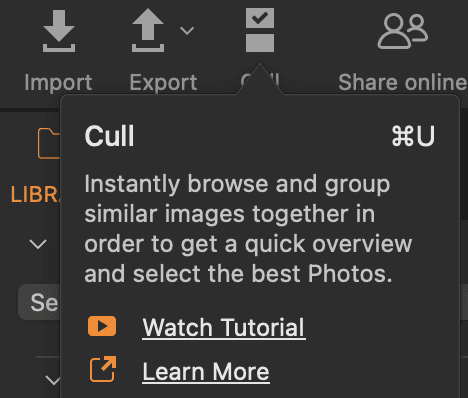
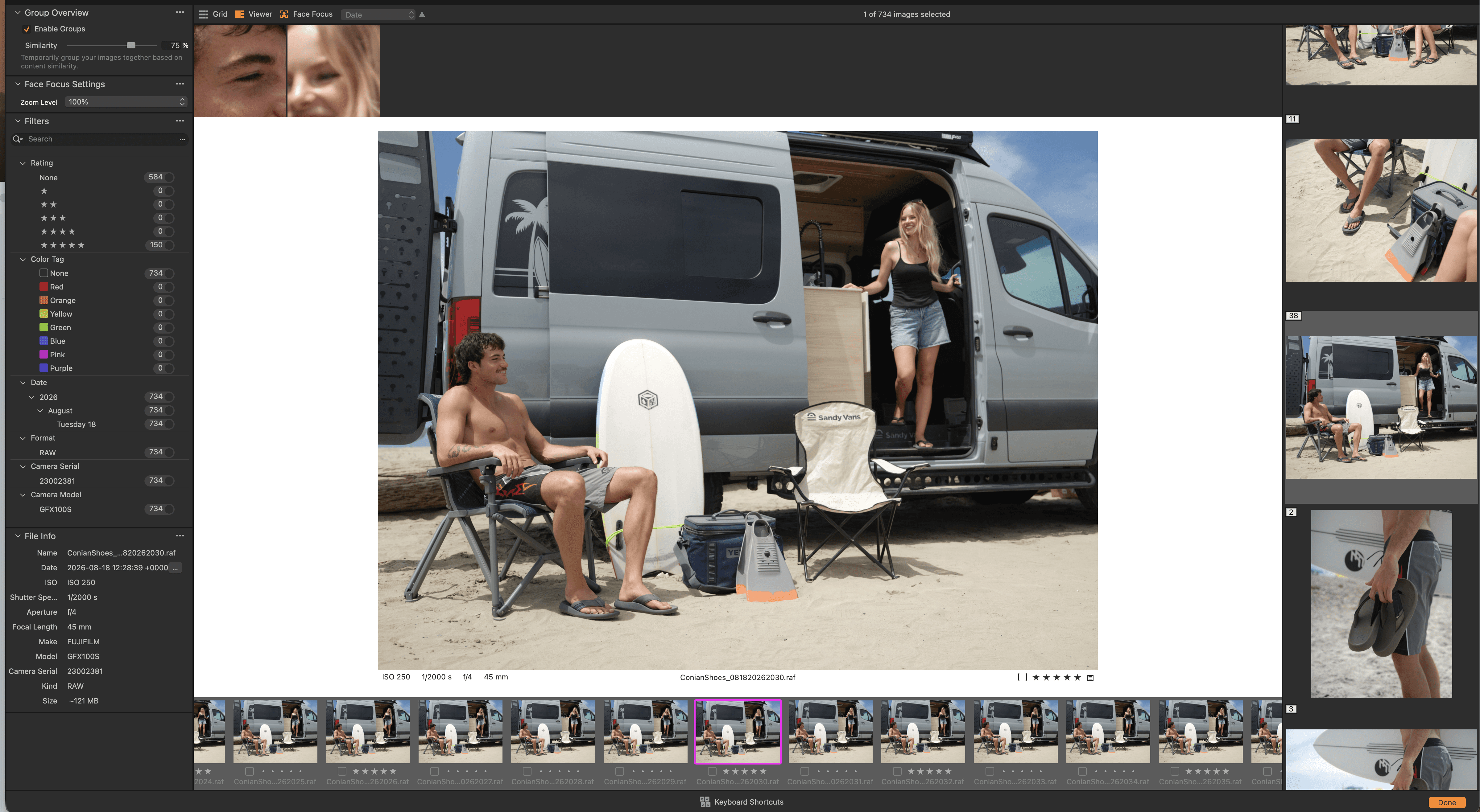
Capture One's Cull view is a dedicated workspace built specifically for this one problem: helping you get from "I just shot 3,000 photos" to "here are my keepers" as fast as possible. Instead of scrolling through a giant grid one image at a time, Cull automatically groups similar shots together, so all the near-duplicate frames from a single pose or setup get bucketed into their own group. You can flip through that group with the arrow keys, zoom in to check focus and expression, and move to the next group without ever losing your place or having to hunt through the whole shoot again.
You rate and tag as you go, using star ratings and color labels, and the tool auto-advances so you're not stopping to click a dozen times per image. It's a completely different rhythm than scrolling through a folder in a normal grid view. It's built for the exact kind of decision fatigue that comes from a full day (or multiple days) of shooting a campaign.
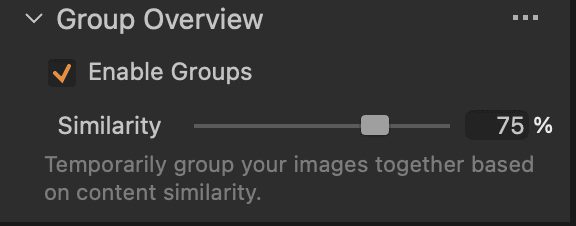
This is the Group Overview settings panel in Capture One's Cull view
Enable Groups (checked) turns on the auto-grouping behavior, so similar shots get clustered together instead of showing as one long flat filmstrip.
Similarity slider (set to 75%) controls how alike two images need to be for Capture One to bundle them into the same group. Push it higher and only near-identical frames group together; pull it lower and it'll lump together shots that are more loosely related (same setup, different pose, etc.).
How I Use It In My Workflow
Here's what my mornings actually look like now. I sit down, open the shoot in Capture One, and go straight into Cull view. Because everything is grouped by similarity, I can move through hundreds of frames in a fraction of the time it used to take, marking my picks and clearing the rest as I go. What used to take me days now takes me the first hour of my morning edit day. First hour. That's it.
Once my selects are locked in, I move directly into editing, and my files are ready to hand off for retouching before lunch. On a multi-day campaign shoot, that used to mean I'd still be culling three or four days later while the clients waited on updates. Now, my clients typically have their photos back in 48 to 72 hours after the shoot wraps, culling, editing, and all.
That's the real story here. It's not just a nice efficiency stat for me. It's a completely different client experience.
Why This Matters For My Clients
Brands hire me because they need content that moves fast. A campaign shoot isn't the finish line, it's the starting point for whatever comes next: paid ads going live, a product launch, a social calendar that's already been mapped out and is waiting on assets. Every day I spend culling is a day their marketing team is stuck waiting instead of executing.
Getting galleries back in 48 to 72 hours means my clients can move on their own timeline instead of mine. Whatever they need the images for, whether that's a same-week product drop or a campaign that's already scheduled to go live, they have what they need to actually use it, quickly.
That's really what I'm about at the end of the day. I want the entire experience of working with me, from the shoot itself to getting the final gallery, to feel easy and even fun, but also genuinely efficient. Those two things aren't in conflict. A relaxed, well-run shoot day and a fast turnaround are both part of the same standard I hold myself to.
Building Something Clients Come Back To
I'm not interested in being a one-and-done vendor. I want the brands I work with to have a reason to bring me back for the next campaign, the next season, the next launch. Speed is part of that, but it's really about trust. When a client knows they're getting a fast, clean turnaround every single time, without having to check in and ask where their gallery is, that's what makes a working relationship worth repeating.
Capture One's Cull feature didn't just save me hours. It changed the shape of my entire post-production process, and it's a big part of how I'm able to deliver on that promise consistently, shoot after shoot.
If you're a photographer still scrolling through a flat grid view trying to make selects one image at a time, I'd genuinely recommend giving Cull a real shot. It's one of the few software changes that's actually moved the needle for how I run my business.


Share this article
Article
How Capture One's Cull Feature Cut My Photo Selection Time by 10x
Oveth Martinez
8.21.25
If you've worked with me on a shoot, you already know I'm a little obsessed with turning things around fast. But there's a part of my workflow that used to be my biggest bottleneck, and it wasn't the shooting, and it wasn't even the editing. It was making selects.
For years, especially on multi-day campaign shoots, picking the final images out of thousands of frames was the slowest, most draining part of my job. I'd sit there scrolling through folder after folder, flagging, un-flagging, second-guessing myself, and by the time I was actually ready to start editing, days had already gone by. Clients were waiting. I was burnt out before I'd even opened a single retouch tool.
That's completely changed since I moved my workflow over to Capture One, and specifically since I started using their Cull feature the right way.
What Cull Actually Does
Capture One's Cull view is a dedicated workspace built specifically for this one problem: helping you get from "I just shot 3,000 photos" to "here are my keepers" as fast as possible. Instead of scrolling through a giant grid one image at a time, Cull automatically groups similar shots together, so all the near-duplicate frames from a single pose or setup get bucketed into their own group. You can flip through that group with the arrow keys, zoom in to check focus and expression, and move to the next group without ever losing your place or having to hunt through the whole shoot again.
You rate and tag as you go, using star ratings and color labels, and the tool auto-advances so you're not stopping to click a dozen times per image. It's a completely different rhythm than scrolling through a folder in a normal grid view. It's built for the exact kind of decision fatigue that comes from a full day (or multiple days) of shooting a campaign.
This is the Group Overview settings panel in Capture One's Cull view
Enable Groups (checked) turns on the auto-grouping behavior, so similar shots get clustered together instead of showing as one long flat filmstrip.
Similarity slider (set to 75%) controls how alike two images need to be for Capture One to bundle them into the same group. Push it higher and only near-identical frames group together; pull it lower and it'll lump together shots that are more loosely related (same setup, different pose, etc.).
How I Use It In My Workflow
Here's what my mornings actually look like now. I sit down, open the shoot in Capture One, and go straight into Cull view. Because everything is grouped by similarity, I can move through hundreds of frames in a fraction of the time it used to take, marking my picks and clearing the rest as I go. What used to take me days now takes me the first hour of my morning edit day. First hour. That's it.
Once my selects are locked in, I move directly into editing, and my files are ready to hand off for retouching before lunch. On a multi-day campaign shoot, that used to mean I'd still be culling three or four days later while the clients waited on updates. Now, my clients typically have their photos back in 48 to 72 hours after the shoot wraps, culling, editing, and all.
That's the real story here. It's not just a nice efficiency stat for me. It's a completely different client experience.
Why This Matters For My Clients
Brands hire me because they need content that moves fast. A campaign shoot isn't the finish line, it's the starting point for whatever comes next: paid ads going live, a product launch, a social calendar that's already been mapped out and is waiting on assets. Every day I spend culling is a day their marketing team is stuck waiting instead of executing.
Getting galleries back in 48 to 72 hours means my clients can move on their own timeline instead of mine. Whatever they need the images for, whether that's a same-week product drop or a campaign that's already scheduled to go live, they have what they need to actually use it, quickly.
That's really what I'm about at the end of the day. I want the entire experience of working with me, from the shoot itself to getting the final gallery, to feel easy and even fun, but also genuinely efficient. Those two things aren't in conflict. A relaxed, well-run shoot day and a fast turnaround are both part of the same standard I hold myself to.
Building Something Clients Come Back To
I'm not interested in being a one-and-done vendor. I want the brands I work with to have a reason to bring me back for the next campaign, the next season, the next launch. Speed is part of that, but it's really about trust. When a client knows they're getting a fast, clean turnaround every single time, without having to check in and ask where their gallery is, that's what makes a working relationship worth repeating.
Capture One's Cull feature didn't just save me hours. It changed the shape of my entire post-production process, and it's a big part of how I'm able to deliver on that promise consistently, shoot after shoot.
If you're a photographer still scrolling through a flat grid view trying to make selects one image at a time, I'd genuinely recommend giving Cull a real shot. It's one of the few software changes that's actually moved the needle for how I run my business.
Share this article
Article
How Capture One's Cull Feature Cut My Photo Selection Time by 10x
Oveth Martinez
8.21.25
If you've worked with me on a shoot, you already know I'm a little obsessed with turning things around fast. But there's a part of my workflow that used to be my biggest bottleneck, and it wasn't the shooting, and it wasn't even the editing. It was making selects.
For years, especially on multi-day campaign shoots, picking the final images out of thousands of frames was the slowest, most draining part of my job. I'd sit there scrolling through folder after folder, flagging, un-flagging, second-guessing myself, and by the time I was actually ready to start editing, days had already gone by. Clients were waiting. I was burnt out before I'd even opened a single retouch tool.
That's completely changed since I moved my workflow over to Capture One, and specifically since I started using their Cull feature the right way.
What Cull Actually Does
Capture One's Cull view is a dedicated workspace built specifically for this one problem: helping you get from "I just shot 3,000 photos" to "here are my keepers" as fast as possible. Instead of scrolling through a giant grid one image at a time, Cull automatically groups similar shots together, so all the near-duplicate frames from a single pose or setup get bucketed into their own group. You can flip through that group with the arrow keys, zoom in to check focus and expression, and move to the next group without ever losing your place or having to hunt through the whole shoot again.
You rate and tag as you go, using star ratings and color labels, and the tool auto-advances so you're not stopping to click a dozen times per image. It's a completely different rhythm than scrolling through a folder in a normal grid view. It's built for the exact kind of decision fatigue that comes from a full day (or multiple days) of shooting a campaign.
This is the Group Overview settings panel in Capture One's Cull view
Enable Groups (checked) turns on the auto-grouping behavior, so similar shots get clustered together instead of showing as one long flat filmstrip.
Similarity slider (set to 75%) controls how alike two images need to be for Capture One to bundle them into the same group. Push it higher and only near-identical frames group together; pull it lower and it'll lump together shots that are more loosely related (same setup, different pose, etc.).
How I Use It In My Workflow
Here's what my mornings actually look like now. I sit down, open the shoot in Capture One, and go straight into Cull view. Because everything is grouped by similarity, I can move through hundreds of frames in a fraction of the time it used to take, marking my picks and clearing the rest as I go. What used to take me days now takes me the first hour of my morning edit day. First hour. That's it.
Once my selects are locked in, I move directly into editing, and my files are ready to hand off for retouching before lunch. On a multi-day campaign shoot, that used to mean I'd still be culling three or four days later while the clients waited on updates. Now, my clients typically have their photos back in 48 to 72 hours after the shoot wraps, culling, editing, and all.
That's the real story here. It's not just a nice efficiency stat for me. It's a completely different client experience.
Why This Matters For My Clients
Brands hire me because they need content that moves fast. A campaign shoot isn't the finish line, it's the starting point for whatever comes next: paid ads going live, a product launch, a social calendar that's already been mapped out and is waiting on assets. Every day I spend culling is a day their marketing team is stuck waiting instead of executing.
Getting galleries back in 48 to 72 hours means my clients can move on their own timeline instead of mine. Whatever they need the images for, whether that's a same-week product drop or a campaign that's already scheduled to go live, they have what they need to actually use it, quickly.
That's really what I'm about at the end of the day. I want the entire experience of working with me, from the shoot itself to getting the final gallery, to feel easy and even fun, but also genuinely efficient. Those two things aren't in conflict. A relaxed, well-run shoot day and a fast turnaround are both part of the same standard I hold myself to.
Building Something Clients Come Back To
I'm not interested in being a one-and-done vendor. I want the brands I work with to have a reason to bring me back for the next campaign, the next season, the next launch. Speed is part of that, but it's really about trust. When a client knows they're getting a fast, clean turnaround every single time, without having to check in and ask where their gallery is, that's what makes a working relationship worth repeating.
Capture One's Cull feature didn't just save me hours. It changed the shape of my entire post-production process, and it's a big part of how I'm able to deliver on that promise consistently, shoot after shoot.
If you're a photographer still scrolling through a flat grid view trying to make selects one image at a time, I'd genuinely recommend giving Cull a real shot. It's one of the few software changes that's actually moved the needle for how I run my business.
Share this article